


“Can we support localized docs?”
Technically, yes. Should you? Maybe not.
Teams underestimate what it takes to maintain translations. Documentation changes constantly, and the translations have to keep up. Most teams can’t.
Mistake 1: Translating without a goal
Google Analytics shows traffic from Japan, someone suggests translating to Japanese, and six months later the Italian docs are outdated and nobody maintains them.
Traffic from a country doesn’t mean you need docs in that language. English is often fine for technical audiences.
Better reason to translate: ou're entering a specific market next quarter, you have native speakers on the team who will maintain it, or you've validated that the language barrier is actually blocking users from adopting your product.
Don't translate "just in case." Translate when you have a specific goal and the resources to maintain it.
Mistake 2: Translating everything at once
You decide to support Italian, so you translate all 200 pages. Three months later the English docs have moved on, the Italian docs are behind, and users hit outdated instructions. Support tickets start arriving in Italian, and nobody on the support team speaks it.
Translation isn’t a one-time project. It’s ongoing maintenance.
Start smaller: Translate the 20% that delivers 80% of the value: installation guides, the quickstart, core concepts. Leave advanced features and edge cases in English. Users can handle some pages in English as long as the critical path is in their language.
Mistake 3: No version control strategy
You spin up separate documentation projects per language. English moves fast, German lags behind, and users hit German tutorials that reference features from version 1.0 when the current version is 3.0. Outdated documentation is worse than no documentation.
You need a policy for managing translation lag. There are three common approaches.
Content availability: Keep the translated sections that haven’t changed, show new content in English until it’s translated, and gradually update the rest. Users see mostly German with some English sections clearly marked “not yet translated.” This works for most technical documentation.
Language consistency: Each language has its own complete version. German might be on v2.0 while English is on v3.0. You tag the outdated docs with a warning and link to the latest English version. This works when you want each language to feel complete, even if it’s behind.
Perfect sync: You wait to release docs until all translations are ready. Medical devices, government contracts, and financial services often require this legally. Documentation and product ship together, all languages synchronized. It works when you have no choice, but otherwise documentation becomes a bottleneck.
Mistake 4: Ignoring SEO
You launch Portuguese docs and Google sees duplicate content (same structure, different language), so your search rankings drop.
Or worse, you don’t configure SEO at all: users in Spain search for your product in Spanish, Google shows them your English docs, and they never find the Spanish version.
Fix it:
Use separate URLs per language (
docs.yoursite.com/es/)Add
hreflangtags (tells Google which language each page is in)Generate complete sitemaps including all languages
For untranslated pages, add
<meta name=”robots” content=”noindex”>so they don’t compete with English versions.
Make translated docs discoverable. Otherwise, why translate at all?
Mistake 5: No consistency between translators
Two people translate your docs into Spanish. One renders “Software Development Kit” as “Kit de desarrollo,” the other uses “Herramientas de desarrollo.” Both are valid, but the inconsistency confuses users into thinking these are two different things.
Create a glossary that maps domain-specific terms to preferred translations:
Software Development Kit → Kit de desarrollo
API → API (don’t translate)
Webhook → Webhook (don’t translate)
Configuration → Configuración
Share it with your translators and make it part of the review process. Technical terms often stay in English, and that’s fine. Consistency matters more than translating everything.
When translation makes sense
You should translate when:
Regulation requires it (medical devices, government contracts, financial services in certain countries)
You’re entering a specific non-English market and English blocks a significant portion of users.
You have budget for ongoing translation (not just initial translation)
You have native speakers maintaining translations
You probably shouldn’t translate when:
Your users are developers (most read English technical docs)
You’re an early-stage product (docs change too fast)
You can’t commit to maintaining translations
You’re translating to “be international” without specific goals
Start with one language
Don’t launch with five languages. Pick one: the market you’re targeting, or the language your team speaks natively. Translate 20% of the docs, the critical path, and see whether it helps. If it does, expand. If not, you haven’t wasted effort translating everything.
Technical setup
Use internationalization (i18n) tooling built for documentation. The basic approach:
Choose a primary language (usually English)
Extract translatable strings into Portable Object Template (POT) files
Translators work with PO files (only the strings, not the full docs)
When original content changes, only changed strings need retranslation
Automate the extraction so that every time the docs update, the POT files regenerate and translators see exactly what changed.
Tools like Transifex or Lokalise show what needs translation in a friendly UI, let team members translate collaboratively, and build in a review process that catches inconsistencies.
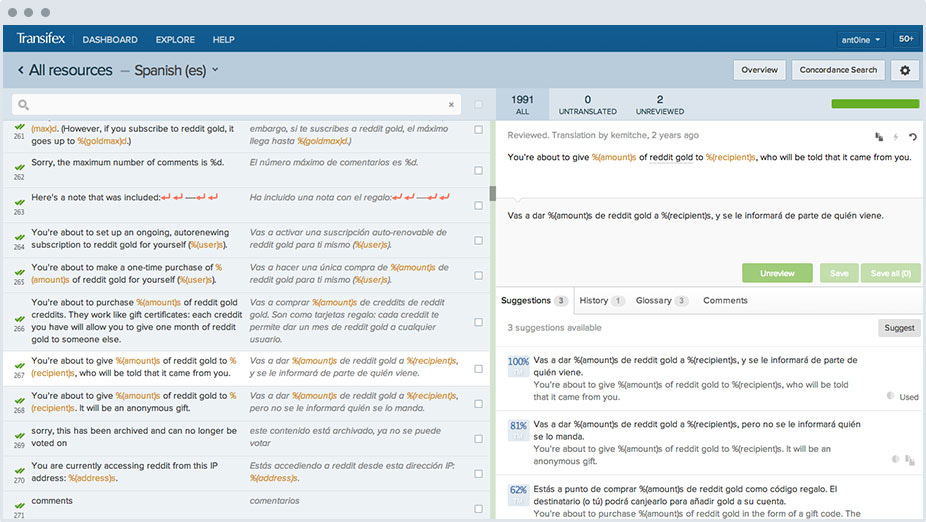
It beats asking translators to edit Markdown files directly.
The real cost
Translation isn’t just the initial cost. It’s ongoing maintenance. Every docs update needs translation. Every new feature, every bug fix that touches the docs, every restructure.
If you ship docs in three languages, every change multiplies by three. If you can't handle that, don't translate yet. Focus on quality in one language first, then expand when you have the resources to maintain it.