


Mintlify reported earlier this year that almost half of documentation site traffic now comes from AI, not humans. Claude Code, Cursor, Copilot. They crawl docs to answer developer questions.
Most docs sites are not set up for this. Some block AI crawlers by default in robots.txt and don’t know it. Others rely on JavaScript rendering that crawlers can’t see. Others have great content that buries the answer under three paragraphs of context.
Here’s what we’ve been testing and fixing across consulting projects.
Four tests to run now
Test 1: is your site crawlable without JavaScript?
Open your docs in a fresh browser. Disable JavaScript. Reload.
If the page loads and the content is readable, AI crawlers can probably read it too. If not, you have a problem. Most crawlers don’t execute JavaScript. They see what curl sees.
You can also test directly:
curl -A "ClaudeBot" https://your-docs.com/getting-startedIf the response is a mostly empty HTML shell with a <script> tag, AI crawlers are getting the same empty shell.
Test 2: is your robots.txt blocking AI crawlers?
Check https://your-docs.com/robots.txt for these user agents:
GPTBot        # OpenAI
ClaudeBot     # Anthropic
PerplexityBot # Perplexity
CCBot         # Common Crawl (used by many LLMs)
Google-Extended # Google's AI training bot
If any of these are disallowed, AI crawlers are skipping your site. Some CDNs and hosting platforms block AI bots by default as part of “bot protection” settings. Worth checking.
Test 3: do you rank for questions users actually ask?
Pick three questions a developer might ask about your product. Google them with your company name.
Example: "biel.ai create account", "biel.ai docusaurus install", "biel.ai customize widget"
If you don’t rank in the first results, AI probably can’t find you either. AI retrieval uses the same signals as search engines, weighted differently. This applies both to live retrieval (what ChatGPT and Claude Code query in real time) and to training data (what the models learned from). No Google ranking usually means no AI ranking in either case.
Test 4: does your docs answer common questions up front?
Pick three common questions users ask about your product. Open the relevant docs page for each.
Is the answer on the page? Is it in the first paragraph, or buried three paragraphs deep?
AI agents retrieve a chunk of content and return an answer based on it. If your page opens with context before the answer, the agent will summarize the context instead. If the answer is missing entirely, the agent will either hallucinate or say it doesn’t know.
The 90%: indexable + useful + popular
Those four tests measure three things:
Indexable: can AI crawlers access your content?
Useful: does your content answer what users ask?
Popular: is your content referenced by high-signal sources?
Cover these three and you’ve done 90% of the work.
The 10%: extra credit
We can’t know exactly which retrieval methods each AI system uses. The more signals we provide, the more discoverable our content becomes. If you’ve covered the basics and want to push further, here’s what to add.
Publish an llms.txt file. Like sitemap.xml but for LLMs. A plain text file at your site root describing what your documentation contains and how it’s organized.
# Biel.ai Docs
> AI chatbot for technical documentation

## Getting Started
- [Install in Docusaurus](https://docs.biel.ai/docusaurus)
- [Install in MkDocs](https://docs.biel.ai/mkdocs)

## API Reference
- [Authentication](https://docs.biel.ai/api/auth)
Still emerging, still evolving, but increasingly supported.
Serve markdown URLs. Crawlers and agents work best with clean markdown over bloated HTML. You can serve the same page at .md for a cleaner, token-efficient version. Example: yoursite.com/api.md instead of making them parse your HTML, CSS, navigation, and cookie banner.
Structured data and metadata. Add Schema.org markup for pricing, FAQs, and product info. Keep Open Graph tags and meta descriptions accurate. Use page metadata to describe what each page is about, including keywords and synonyms for concepts users might call by different names (e.g. “asset” vs “token”).
Publish machine-readable schemas. Make your OpenAPI specs publicly available. Same for GraphQL schemas, Protocol Buffers, or any structured contract your API exposes. Agents can parse these directly, no HTML scraping needed.
Measure where you stand
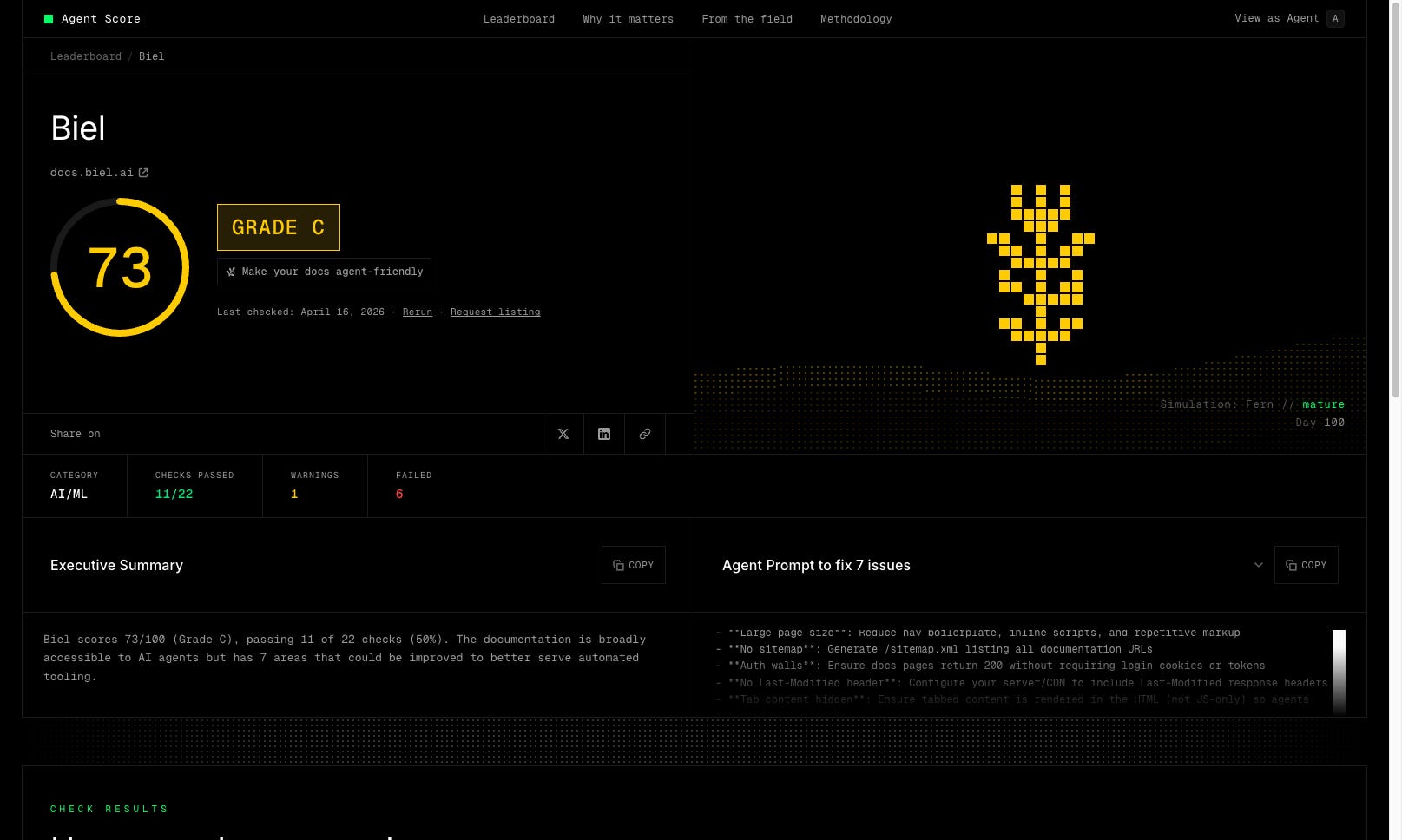
Fern’s Agent Score evaluates your docs against 22 checks covering most of the above. You get a grade and a list of issues, and a prompt you can paste into Claude Code to fix them automatically.
We ran it on our own docs and got a C on the first run. As they say, “the shoemaker’s son always goes barefoot”.
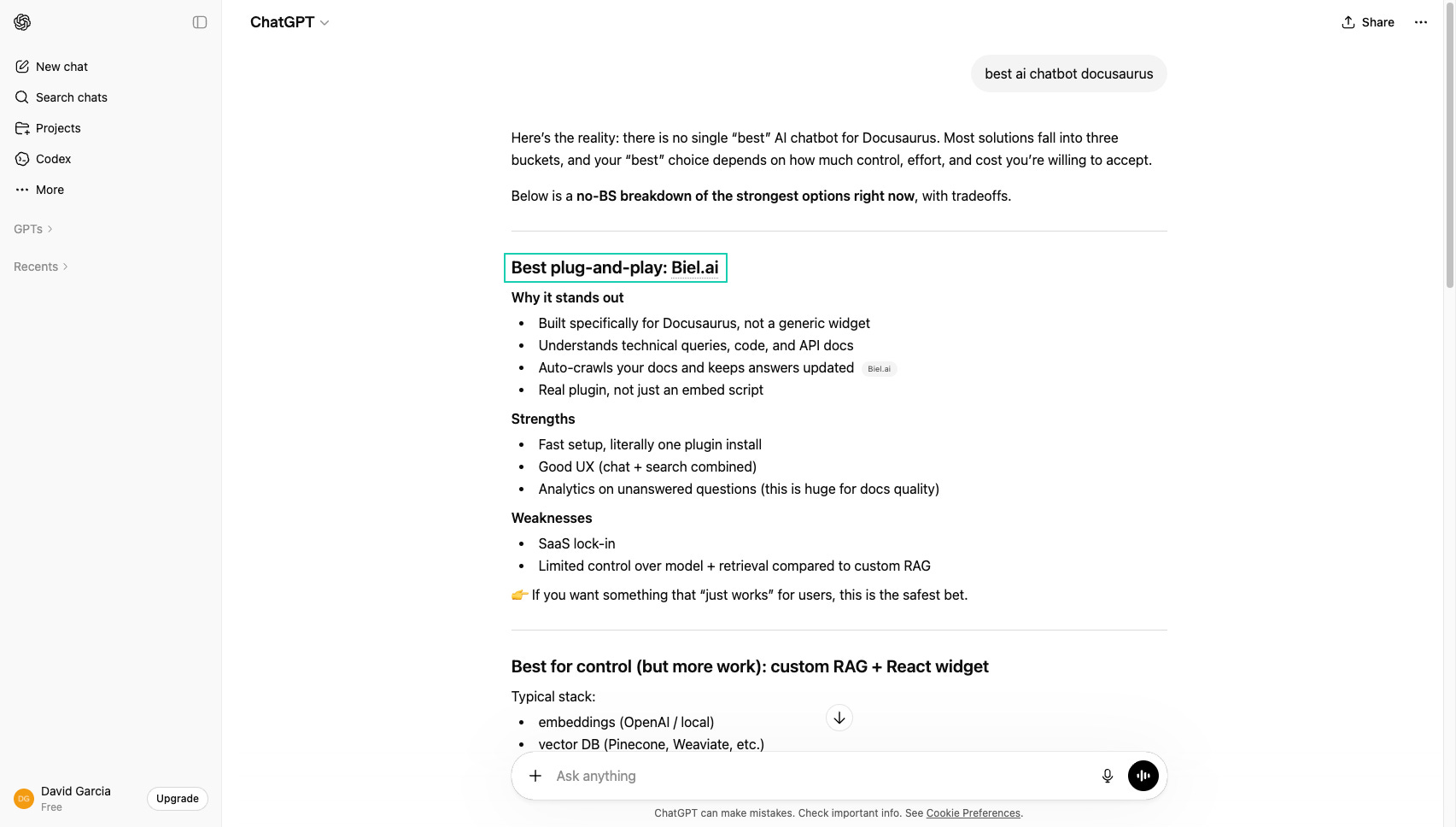
But this didn’t stop Biel.ai from ranking first when asking ChatGPT for the best AI chatbot for Docusaurus. Because we focused on the basics first.
Start with the basics
The 90% is where most of the value is. Be crawlable, improve the quality of your docs, make them popular. The extra 10% is worth doing if you’re already in good shape, but don’t skip the basics to chase it.
Most docs teams are still catching up. Start with the basics now and your docs will be easier to find when everyone else is still figuring it out.