


New product. No documentation. Zero.
The instinct is to start writing immediately, to get something out there and show progress. A smarter approach is to spend a few weeks on strategy first. Who is your audience? What do they need? Which content types matter? What’s a real priority versus nice-to-have?
It feels slow, but once you have that clarity, writing moves fast.
Most documentation disasters come from organic growth. One team adds a page here, another adds one over there, and nobody is thinking about the whole. Structure only becomes a concern after hundreds of pages exist, by which point nothing is easy to find.
The pattern is always the same: content, then more content, then nobody can find anything. Then someone finally asks “should we reorganize this?” when reorganization means touching 300 pages and breaking every bookmark and search result.
Strategy → Structure → Content.
Not Content → More Content → Chaos.
What documentation strategy actually means
Strategy doesn’t mean a 40-page plan. It means answering a few critical questions before anyone writes a word.
Who are you writing for?
Not “developers.” That’s too vague. Define specific personas in specific situations. A developer integrating your API under deadline pressure needs different content than an enterprise architect evaluating your security model. Pick a primary audience. Acknowledge the others exist, but know who you’re optimizing for.
What job is each piece of documentation doing?
Documentation serves different purposes:
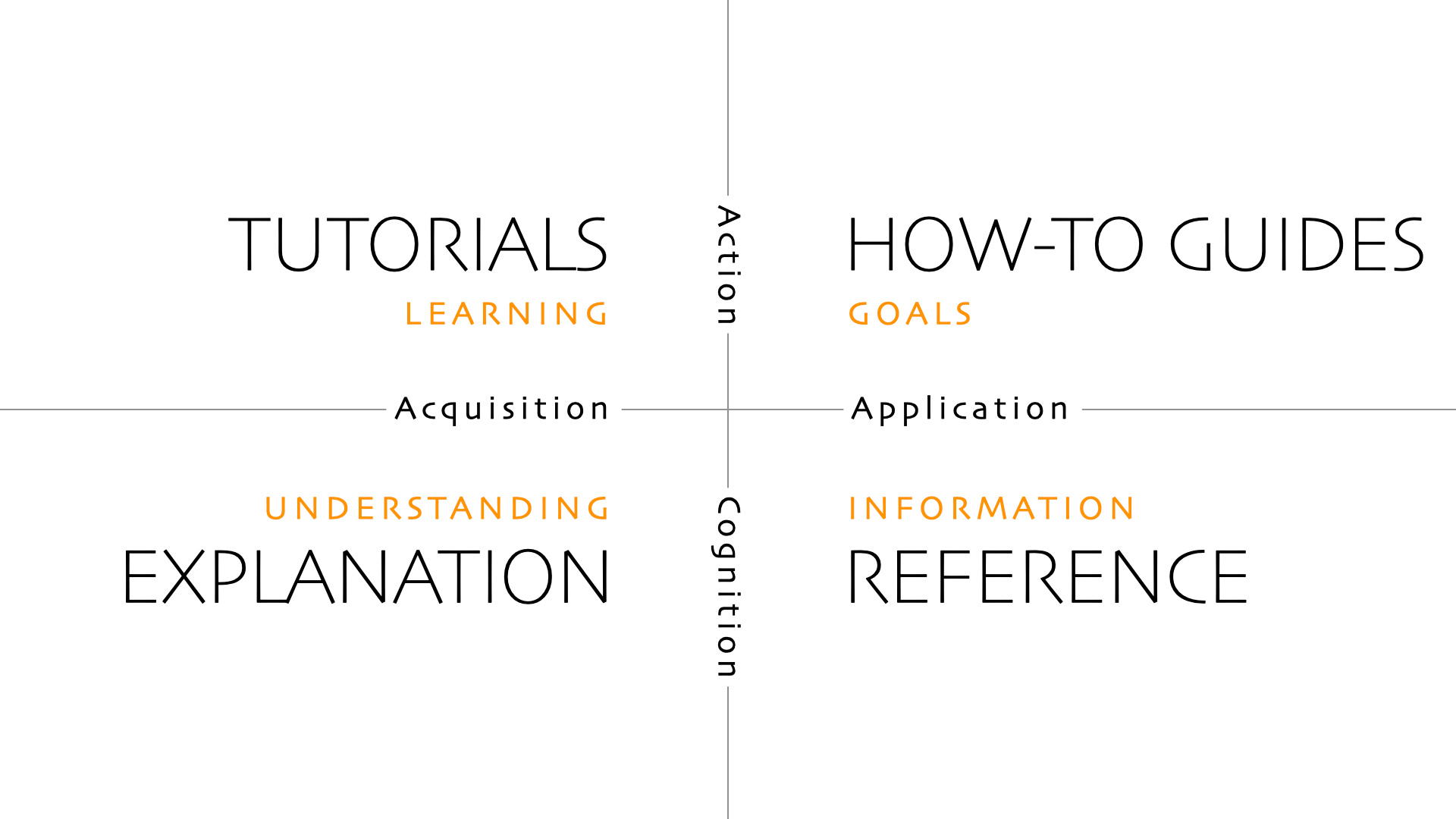
Teaching a concept through example (tutorial)
Solving a specific problem (how-to guide)
Looking up syntax (reference)
Understanding why something works this way (explanation)
These aren’t interchangeable. A reference doc won’t teach a beginner. A tutorial won’t help someone troubleshooting at 2am. Your strategy needs to decide which jobs matter most for your product and your users, then commit to doing those jobs well.
What’s the minimum content that unlocks the product?
You don’t need comprehensive API docs on day one. You don’t need advanced guides for features nobody’s using yet. You need whatever removes the biggest obstacle between a new user and their first success.
Everything else can wait. The question isn’t “what should we document eventually?” It’s “what’s blocking someone right now?”
What should each page cover?
Once you know which content types you need, define what makes each one complete. Tutorials should list prerequisites up front and guide users to a working example. API references need request examples, response formats, and error codes. How-to guides should state the outcome at the start and show the steps clearly. Explanations need context on why things work the way they do.
This is where templates help. They ensure consistency and completeness across your documentation. But templates only work after you’ve defined your strategy. Without clarity on what each page type requires, templates just give you consistently incomplete content that raises more questions than it answers.
The early content trap
In practice, you can ship some early content while doing this thinking. You should, even. But those quick wins shouldn’t define the strategy.
You’ve seen how this goes. You ship a tutorial because five users asked for it, then a troubleshooting doc because support is overwhelmed, then someone adds an FAQ, then best practices. Each one makes sense in isolation. None of them were planned together. Six months later you have 50 pages organized by the order they were written, not the order anyone needs them.
A strategic early win looks different. You know it’s one piece of a larger system. You know where it lives, and what comes before and after it. Even if you haven’t written those other pieces yet, you’ve left room for them.
It’s the difference between “we need a tutorial, someone write it” and “we need a tutorial that assumes zero prior knowledge, gets someone to a working integration in under 10 minutes, and hands them off to either the API reference or advanced tutorials depending on what they want to do next.” Same deliverable, completely different foundation.
What changes when you do this right
The writing gets faster, because you’re not reinventing structure with every new page or second-guessing where something belongs.
Maintenance gets easier, because when the product changes you know exactly which docs need updating and how the pieces relate.
Users find what they need, not because your search is amazing but because the structure matches how they think about problems. A
nd new contributors can add content confidently, because the system makes it obvious where things go.
None of this happens if you start with content and hope structure emerges. Structure rarely emerges on its own. Chaos does.
How to start
You don’t need perfect answers to those strategy questions. You need good-enough answers and permission to revisit them.
Spend a week, maybe two. Talk to five users about what they’re trying to do. Look at your support tickets to see what’s actually confusing people. Then sketch the 10 to 15 core topics your documentation needs to cover and how they connect.
The approach I use is to map navigation flows for each persona first. Where does a junior developer enter your documentation? What’s their path to first success, and what do they need next? Where does a senior architect start, and what questions do they need answered to evaluate your product? Sketch these journeys: where each audience enters, what they read, and where they go when they’re stuck.
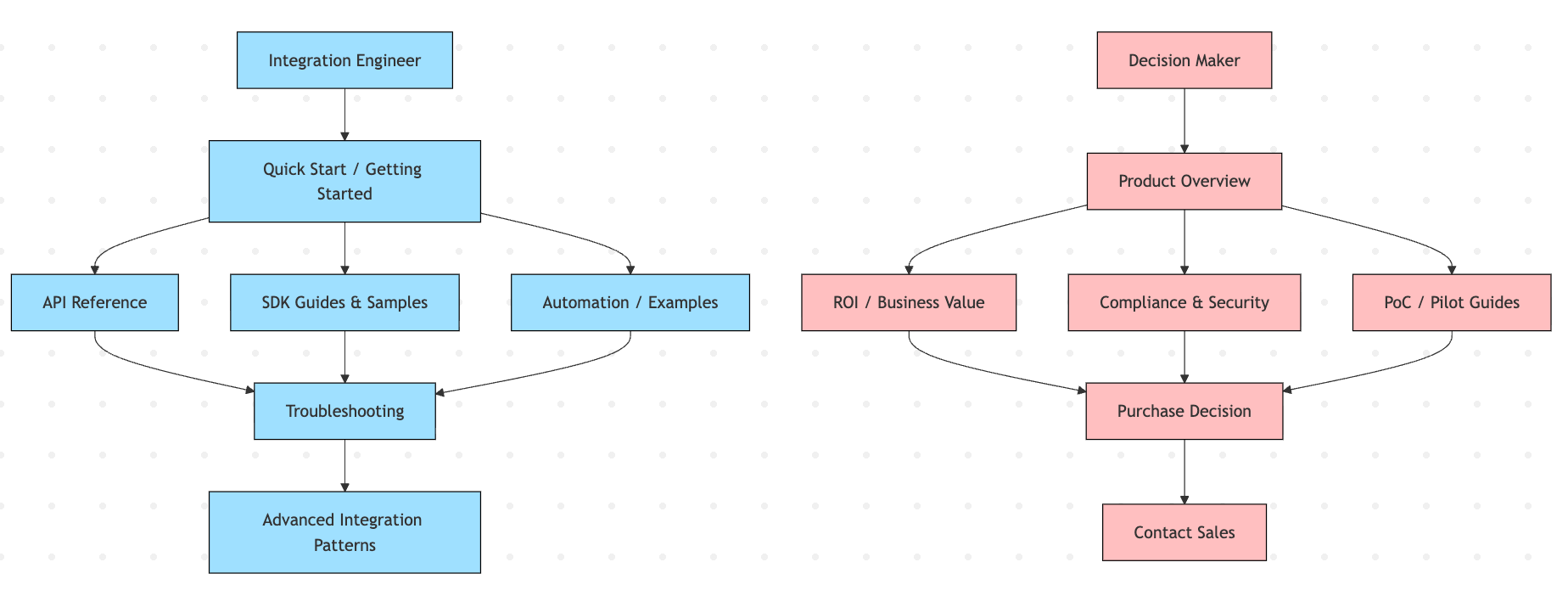
Example navigation flows for two different personas. Use it to identify key content and paths.
These flows reveal what content you actually need, not just what seems logical to document, and they give you your structure.
Structure isn’t about folders. It’s about reflecting how users think about your product. If they think in workflows, organize by workflow. If they think in features, organize by feature. Don’t organize by how your engineering team structured the codebase, because nobody outside your company thinks that way.
Then build a grid in a spreadsheet, one row per page or section you think you’ll need. Give it columns for the page title, the persona it serves, the content type (tutorial, reference, how-to, explanation), the priority (must-have for launch, nice-to-have, future), and a short description of what the page covers.
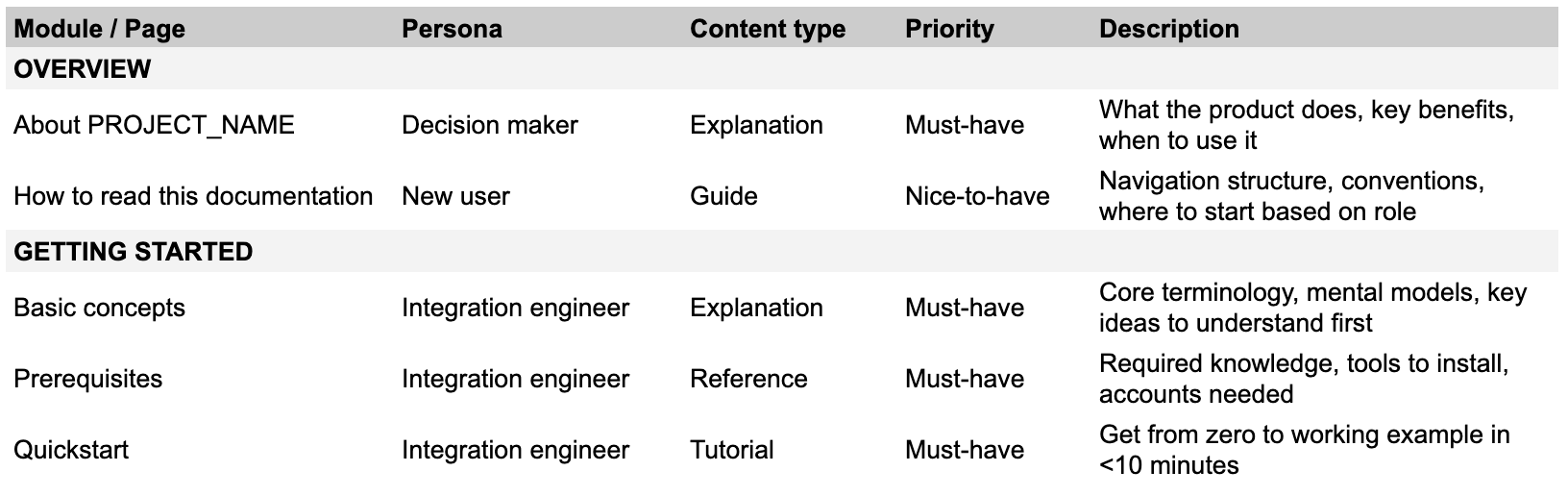
Columns for:
Module / page title
Persona: who is this for?
Content type: tutorial, reference, how-to, explanation
Priority: must-have for launch, nice-to-have, future
Description: Brief description of what the page covers, required subheadings.
The grid forces you to think about the whole system at once instead of page by page. You’ll spot gaps (”wait, we have five reference docs but no how-tos?”) and redundancies (”these three pages are basically the same thing”).
One thing I’ve found useful: identify your action-oriented content first, the tutorials and how-to guides, then build reference and explanation docs around them. Those supporting docs can be referenced from multiple guides, so you’re not repeating the same API details in every tutorial. The guides stay focused on the task while the depth lives somewhere reusable.
Together, the flows and the grid become your roadmap. When someone asks “should we document X?” you can see where it fits, or doesn’t. When priorities shift, you adjust the plan instead of 47 individual pages.
Then you start writing. But now you’re writing into a framework, not into a void.
Strategy doesn’t slow you down. It’s what makes fast sustainable.
Planning your documentation strategy?
If you’re staring at documentation chaos or launching something new and want to avoid building problems into your foundation, we can help.
We work with teams to design content architecture that scales: mapping personas, defining structure, and creating the roadmap before anyone writes a word.