


Property tables look organized, but they break down fast with complex configurations.
Here’s a typical configuration table:
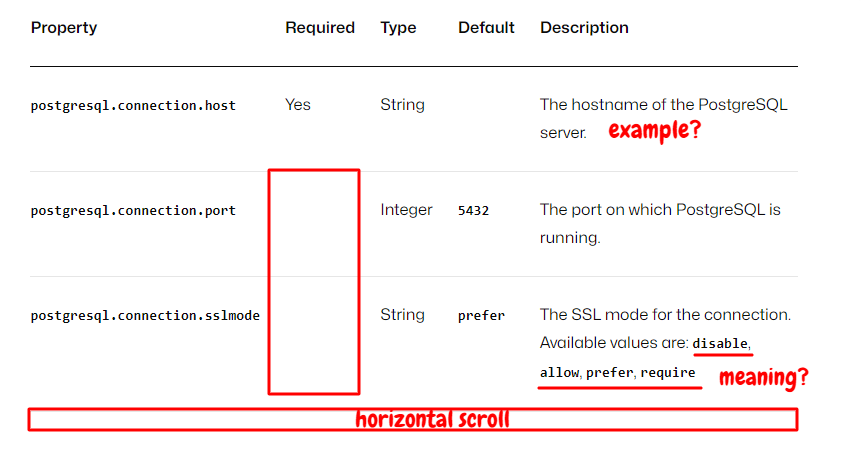
Clean at first glance, but painful in practice.
The problems
Limited space for descriptions: That sslmode property has four possible values with different behaviors. The table cell gives you 50 characters. You either truncate important information or your table explodes horizontally.
Horizontal scrolling: Wide tables scroll off the screen. Users on mobile give up. Users on desktop get annoyed.
Hard to edit: Try adding a line break or list inside a Markdown table cell. You’ll remember why you hate tables.
Unnecessary fields: Not every property is required. Not every property has a default. But tables force you to create columns for everything, leaving empty cells everywhere.
Inflexible: Need to add “Available values” as a column? Rebuild the entire table.
An alternative approach: description lists
Instead of cramming everything into cells, give each property its own block:
postgresql.connection.hostname
The hostname of the PostgreSQL server.
Required
Type: String
Example: localhost
postgresql.connection.port
The port on which PostgreSQL is running.
Type: Integer
Default: 5432
postgresql.connection.sslmode
Determines whether to use SSL and the level of verification required.
Type: String
Default: prefer
Available values:
- disable: SSL is not used for the connection.
- allow: First attempts a non-SSL connection. If that fails, attempts an SSL connection.
- prefer: First attempts an SSL connection. If that fails, attempts a non-SSL connection.
- require: SSL is used for the connection.
Why it works
Space for actual explanations: Complex properties get the room they need. sslmode gets four detailed options instead of a cramped sentence.
No horizontal scrolling: Content flows vertically. Works on any screen size.
Easy to edit: Update one property without touching the others. Add lists, code blocks, whatever you need.
Automatic linking: Most documentation systems generate anchor links for each property. Users can share #postgresql.connection.sslmode directly.
Only show relevant fields: Required properties show “Required.” Optional properties don’t. No empty cells cluttering the page.
The catch
Most documentation systems don’t support rich description lists by default, so you’ll likely need a plugin or a custom extension. It’s worth it for complex configurations, and not worth it for simple two-column data.
Real-world examples
Conclusion
Tables aren’t evil. They’re just overused for the wrong problems.
Use tables for simple data (two or three columns), short descriptions, and uniform properties where every row has the same fields.
Use description lists for complex properties with multiple options, long explanations, and properties with different fields, where some are required, some have defaults, and some have neither.
Now, you have another tool in your chest. Use it wisely.